
Morioh High Stand Controls: Keys, Buttons & Combat Inputs
Morioh High stand controls explained — keyboard inputs, mobile buttons, combat combos and how to activate Stand abilities on PC and mobile Roblox.
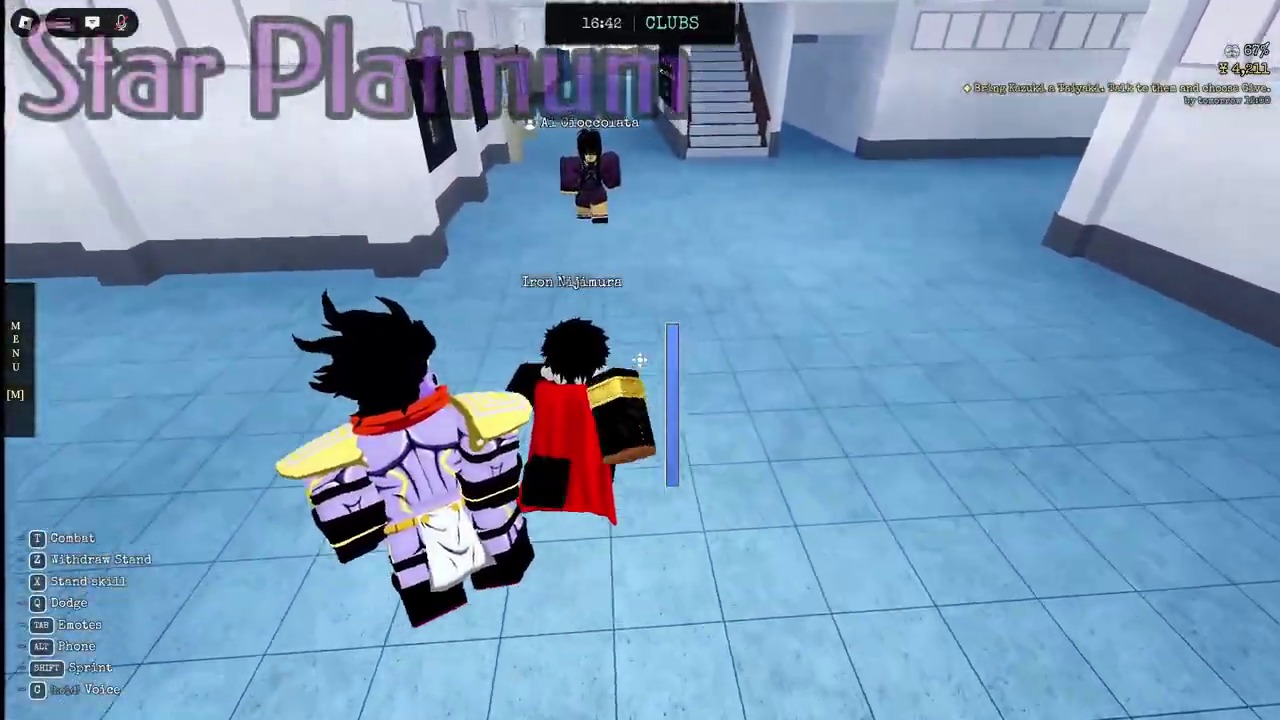
Morioh High runs on Roblox, which means the control scheme follows Roblox conventions — WASD movement on PC, touch controls on mobile, and an ability bar for Stand skills. This guide covers every confirmed input, how Stand abilities trigger, and how to build combat combos that flow naturally.
Basic movement and interaction controls
| Action | PC input | Mobile input |
|---|---|---|
| Move | WASD or arrow keys | Virtual joystick |
| Jump | Space bar | Jump button |
| Sprint | Shift (hold) | Sprint button |
| Interact / Talk to NPC | E or click prompt | Tap interaction prompt |
| Attack (basic) | Left click | Attack button |
| Block | F or right click (待确认) | Block button |
| Dash | Q (待确认) | Dash button |
The core controls follow standard Roblox action game conventions. Movement uses WASD or the virtual joystick, attacks use left click or the attack button, and interactions use E or tap prompts. Some inputs like block and dash are community-reported rather than officially confirmed, so treat those as current best information.
Stand ability controls
Every Stand in Morioh High has a signature ability that activates through the ability bar:
| Input | Function | Notes |
|---|---|---|
| Number keys 1-4 | Ability slots | Each Stand maps abilities to slots |
| Skill button (mobile) | Triggers signature ability | Placement varies by Stand |
| Stand summon (待确认) | Toggle Stand on/off | Community-reported |
When you activate a Stand ability, the signature effect triggers — time stop, life-giving punches, friction removal, void form, or whatever your Stand's kit offers. The abilities guide breaks down what every ability does, and the showcase page shows visual demonstrations.
Building combat combos
Combat in Morioh High rewards timing and flow. The basic combo structure works like this:
- Open with movement — Dash or walk into range, closing the gap without wasting abilities.
- Land basic attacks — Left click or attack button builds combo momentum and sets up ability timing.
- Activate your Stand ability — Trigger your signature skill when the enemy is locked in hit stun or during an opening.
- Follow up — After the ability effect, continue with basic attacks or a second ability before the cooldown expires.
The specific combo depends on your Stand. Star Platinum: The World wants time stop → basic attacks → follow-up while enemies are frozen. Gold Experience wants alternating Life Giver punches with basic attacks for sustained damage and healing. Cream wants Void form for invincibility windows, then basic attacks when the void ends.
Controls per playstyle
| Your setup | Recommended approach |
|---|---|
| PC (keyboard + mouse) | Full control — use number keys for abilities, left click for attacks, space for jumps |
| PC (trackpad) | Possible but harder — consider a mouse for precision clicks |
| Mobile (touch) | Use the ability bar, practice thumb positioning for quick skill access |
| Gamepad (待确认) | Roblox supports some gamepad inputs, but Morioh High-specific mapping is not confirmed |
PC players have the most control precision, which matters for timing-dependent Stand abilities. Mobile players can still compete — the ability bar and attack button are within thumb reach — but precise combo timing takes more practice.
Tips for better control flow
- Practice in safe areas. The sports field and courtyard are wide-open spaces where you can drill combos without real consequences.
- Learn your cooldown rhythm. Every ability has a cooldown timer. Internalizing the rhythm means you never waste an ability during its cooldown.
- Use dash for spacing. Dash is your escape tool and your gap-closer. Learn when to use it offensively versus defensively.
- Watch your stamina. Some abilities drain stamina — Wonder of U's 17-hit route costs 32.3 stamina. Running out mid-combo is punishing.
- Adjust Roblox settings. Camera sensitivity, FOV, and keybinds are available in Roblox's settings menu. Tune them for comfort.
Common control questions
Can I remap keys? Roblox allows some keybind customization through the settings menu. Specific in-game keybinds for Morioh High follow Roblox conventions, and custom mapping may be limited by the platform.
Does mobile have all abilities? Yes. The mobile UI includes the ability bar with the same skill slots as PC. Activation is through on-screen buttons rather than number keys.
What about controller support? Roblox supports gamepad input at the platform level. Whether Morioh High has specific gamepad mappings for Stand abilities is 待确认 — check official channels for confirmation.
How do I block? Blocking mechanics are community-reported but not fully documented. The game description mentions combat depth, and blocking is standard in Roblox action games. Test in safe areas to confirm the input.
Connecting controls to strategy
Controls are the vocabulary of combat. Once you know every input, the real skill is deciding when to use each one. The how to control stands guide covers combat strategy and timing, while this page covers the raw inputs.
Morioh High launched on October 2, 2026, and developer Not A Stand Game continues to update the game. Control schemes may be refined in future patches, so check official channels for announcements.
Advertisement
Related
Browse the full stands hub, or return to the Morioh High wiki home.